FDO / PLUGIN TEMPLATES
Plugin templates.
Ten runnable starting points, bundled with FDO 1.0.5. Every template
includes source, tests and a development guide. No AI request is
required to create one.
Local tools & dashboards SSH & Git Create your plugin
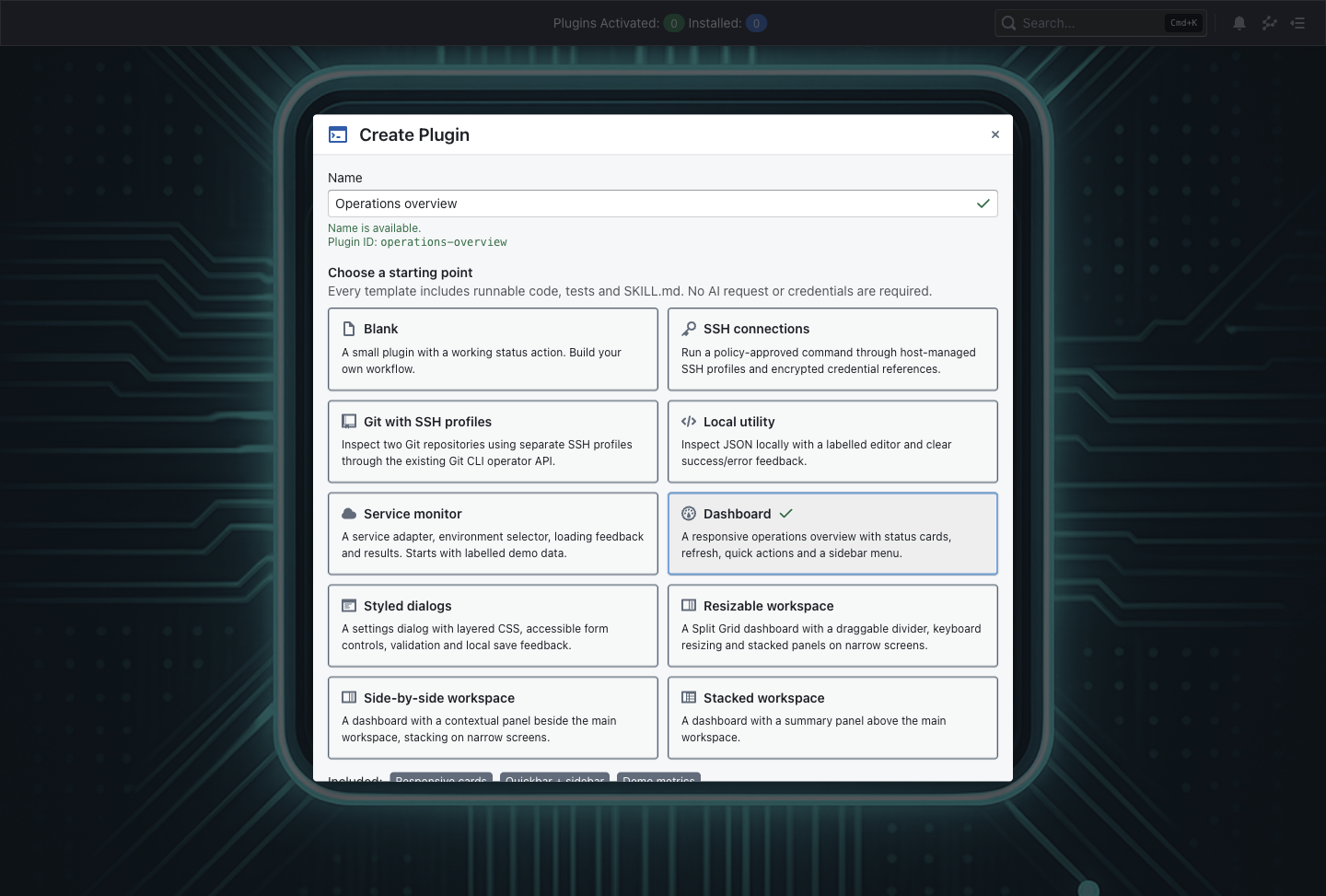
The Create Plugin picker in FDO 1.0.5
SSH and Git starters
Connect to a server
SSH connections
Select a host-managed SSH profile and run an approved remote
uptime inspection.
Built-in SSH works on macOS, Windows and Linux. Configure
credentials, a trusted host key and grants; the remote uptime
command needs a compatible server.
View actual template source ↗ ssh
Inspect Git remotes
Git with SSH profiles
Inspect references for two repositories with separate SSH
credential profiles.
Install Git on the computer running FDO, approve its process scope
and configure the profiles. GitOps’s bundled Git is separate.
View actual template source ↗ gitSsh
Local tools, dashboards and layouts
Start small
Blank
Metadata, a styled page and a working status action.
No external service or AI request required.
View actual template source ↗ blank
Handle local data
Local utility
Inspect JSON with type, count, top-level keys and malformed-input
feedback.
Runs locally without external credentials.
View actual template source ↗ utility
Build a service view
Service monitor
Choose an environment, load asynchronous demo results and handle
loading or failure.
The adapter starts with labelled demo data. Configure your real
service and capabilities when replacing it.
View actual template source ↗ service
Create an operations overview
Dashboard
Demo status cards, refresh, quick actions and sidebar navigation.
No production systems or credentials are connected by default.
View actual template source ↗ dashboard
Build a settings workflow
Styled dialogs
A native modal with form validation, local save feedback and
layered styling.
Starter settings are local to the running plugin session.
View actual template source ↗ dialogs
Arrange an adaptable workspace
Resizable workspace
A keyboard-accessible divider and panels that stack on narrow
screens.
Uses FDO’s injected Split Grid support.
View actual template source ↗ splitGrid
Keep context alongside work
Side-by-side workspace
A dashboard with contextual and main panels next to one another.
Stacks on narrow screens. Demo metrics are not live monitoring
data.
View actual template source ↗ horDivided
Put the summary first
Stacked workspace
A dashboard with a context panel above the main workspace.
Includes quick actions, sidebar navigation and demo metrics.
View actual template source ↗ verDivided
Open a template. Make it yours.
In FDO, open Create Plugin from the Plugins menu or command search.
Enter a name, choose a template and select Open editor.
Read README.md and SKILL.md, edit the source, and run the included
tests.
Compile, sign and deploy the plugin. Review its capability grants
before using privileged operations.
Use the FDO CLI for terminal workflows,
workspace snapshots before
experiments, and
the full template guide
for styling and maintenance details.
← Back to FDO